Robotic Workstation Guide: How to Choose the
Right Cobot Platform for Your Application
Robot pedestals, modular cobot cells, and everything between — a practical guide for manufacturers
who need to get the workstation decision right the first time.
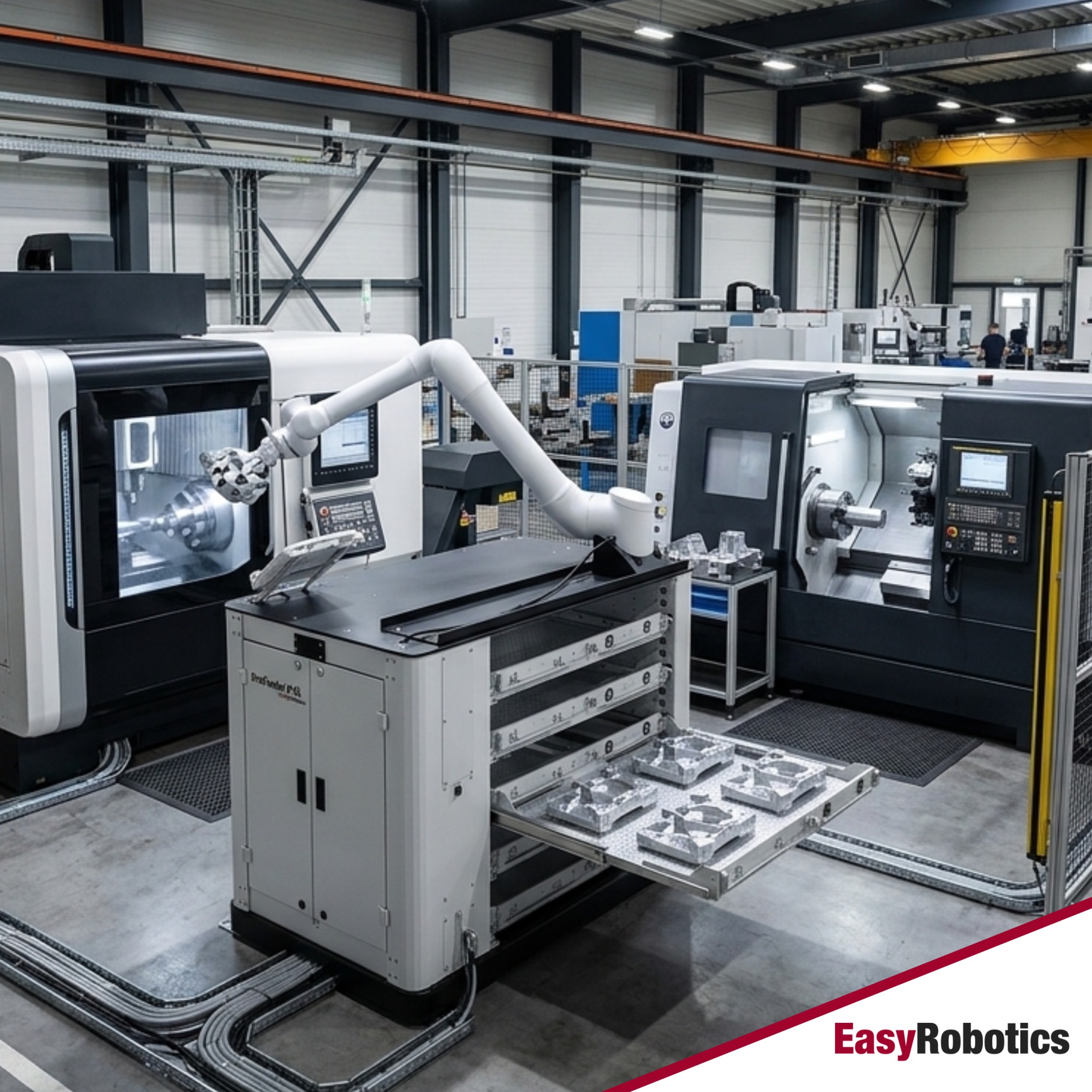
Every cobot deployment begins with the same question that very few robotics buyers think to ask until it is too late: where exactly is the robot going to live? Collaborative robots do not float in mid-air. They mount on something. And the quality of that something — its stability, its height adjustment range, its mobility, its cable management, its integration with the task at hand — determines whether the automation project runs reliably for years or becomes an expensive frustration within months.
A robotic workstation is the physical platform on which a cobot operates. It sets the working height, provides structural stability during operation, manages cables and tooling, and in more advanced configurations integrates feeders, safety systems, and production interfaces directly into the cell. Getting this choice right is not a secondary concern — it is the foundation that every other element of the automation project rests on.
This guide covers the full spectrum: from the simplest robot pedestal that positions a cobot arm over a workbench, to fully integrated modular tending cells that run unattended overnight. We explain what differentiates one option from another, which applications each platform suits, and how the EasyRobotics product range maps to those needs — so you can make an informed decision before the robot arrives on site.
"The EasyPedestal was straightforward to set up and immediately gave our team a stable, reliable base for the cobot. We had it running in under a day — no specialist needed." — Marco V., Production Engineer, EasyRobotics Customer
What Is a Robotic Workstation — and Why Does the Platform Choice Matter?
In broad terms, a robotic workstation is any engineered structure that mounts a robot arm and positions it correctly for its intended task. But that definition covers an enormous range — from a basic welded steel column to a fully equipped mobile cell with integrated part feeders, safety interlocks, touch-screen HMI, and automated door control. The choice between them has significant consequences for deployment speed, production flexibility, and long-term cost.
The wrong workstation introduces problems that are easy to underestimate at the point of purchase. A platform that is too low or too high forces the cobot to operate at the edge of its reach envelope, reducing speed and increasing mechanical wear. A platform without cable management creates routing tangles that catch operators and eventually damage harnesses. A platform that cannot be relocated ties the cobot permanently to one machine — eliminating the flexibility that made the collaborative robot attractive in the first place.
Conversely, a well-chosen robotic workstation multiplies the value of the cobot investment. It positions the robot at its optimal working height for maximum speed and payload. It keeps cables routed cleanly so the robot can move freely through its full range of motion. It allows the entire cell to be moved to a new machine in minutes when production priorities shift. And in integrated configurations, it provides the part storage, tool changeover, and safety architecture that enables fully unattended production runs.
Understanding the spectrum of options — and where each one fits — is the starting point for any successful cobot deployment.
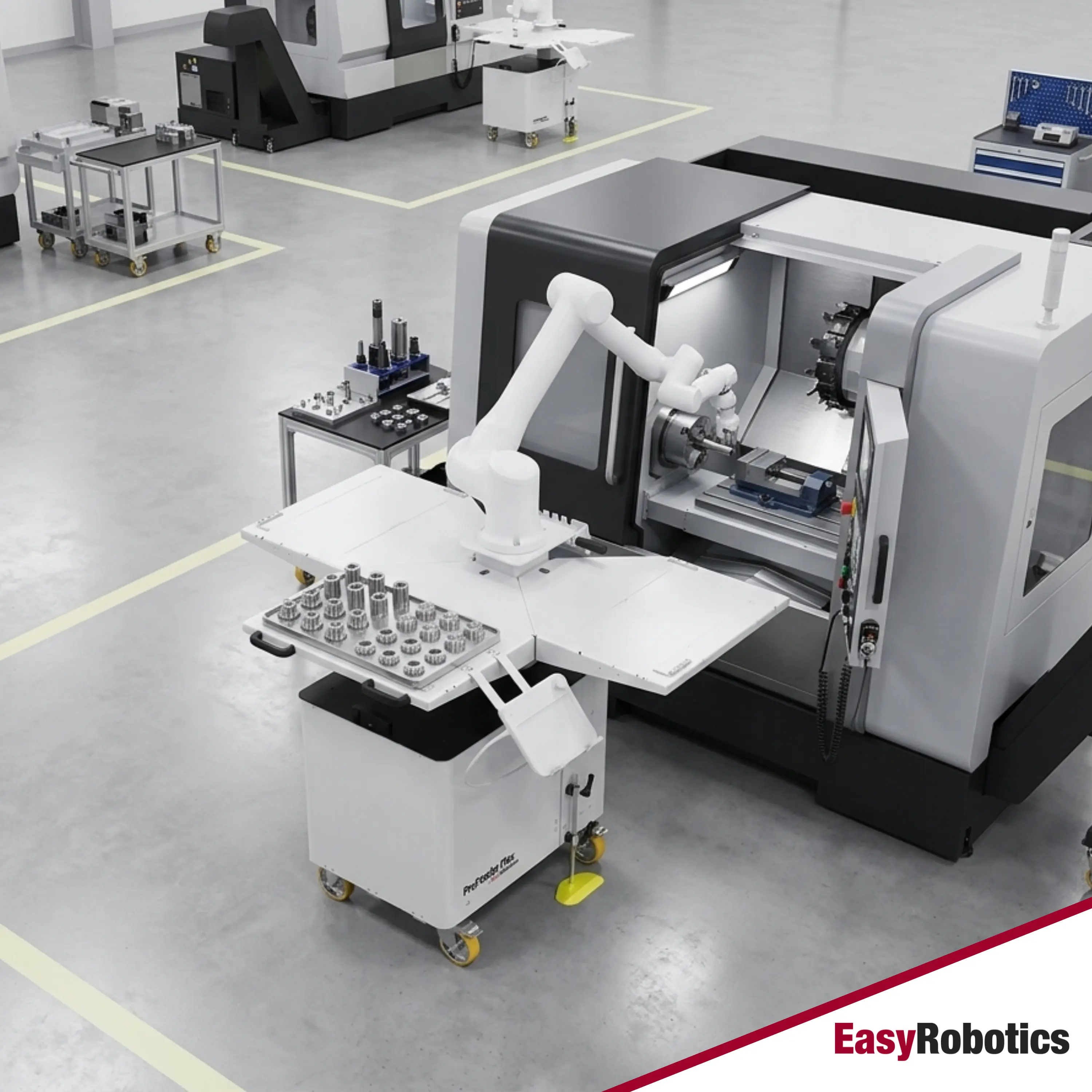
The Robotic Workstation Spectrum: From Robot Pedestal to Integrated Tending Cell
Robotic workstations exist on a spectrum of integration complexity. Understanding where each level sits — and what it adds over the level below — helps you match the platform to the actual requirements of the application rather than over- or under-specifying.
Level 1 — The Robot Pedestal
A robot pedestal is the simplest form of robotic workstation: a rigid, freestanding column that mounts the cobot at the correct working height for the application. A good pedestal is more engineered than it first appears — it must be sized correctly for the robot model's moment load, include a low centre of gravity to resist tip forces during dynamic moves, and provide a clean top plate that matches the robot's bolt pattern without adapter plates that introduce misalignment.
The EasyRobotics EasyPedestal is purpose-designed around these requirements. It provides a stable, vibration-damping base for all major cobot brands, with optional height adjustment and an integrated cable routing channel that keeps the robot base clean. It is the right choice when the robot is positioning over a fixed workpiece, integrated into an existing production fixture, or operating in a cell where the surrounding infrastructure handles the part feeding and tool management.
Level 2 — The Modular Cobot Workstation
A modular cobot workstation adds a working surface, cable management, and configurable storage to the base pedestal function. This is the tier most relevant to assembly, inspection, dispensing, and bench-level handling tasks — applications where the robot needs a defined work area with consistent part presentation, tool storage within reach, and a surface that keeps the cell organised.
The EasyWork and EasyDesk from EasyRobotics sit at this level. They provide configurable work surfaces with modular panel systems, integrated robot mounting, and a clean layout that operators find natural to work alongside. Both are mounted on lockable castors for full floor mobility. The EasyDesk series includes tray and aluminium profile variants, suited to different fixture and tooling requirements.
Level 3 — The Machine Tending Cell
Machine tending cells go beyond a work surface to integrate a part feeding system directly into the workstation. For CNC tending applications, this means trays of raw blanks the robot can pick from autonomously across an entire shift — without operator intervention for each load cycle. The workstation manages part presentation height, blank orientation, cycle sequencing, and the interface with the CNC machine door.
The ProFeeder Tray, ProFeeder S, and the broader ProFeeder series sit at this level — complete, pre-engineered tending cells that combine the cobot mounting, a multi-tray high-capacity feeder system, and all the interface logic needed for unattended CNC operation. The entire cell rolls to the machine on castors and is operational the same day.
Level 4 — The Enclosed Application Cell
Some applications require a physical enclosure around the robot workspace — either for safety compliance in higher-risk processes, to contain weld spatter and fume in welding applications, or to create a defined, repeatable environment for precision work. At this level, the workstation becomes a complete enclosed cell with integrated guarding, access interlocks, and often a specialised work surface matched to the process.
The EasyWeld Station, FlexiGuard Tending Station, and Easy Enclosure sit at this level. Each provides a complete enclosed robotic workstation for its specific application, with all safety architecture built in — no separate integration of guarding, interlocks, or process-specific interfaces required.
📊 Robotic Workstation Spectrum — Quick Reference
Level 1 — Robot Pedestal: Stable cobot mount, height-optimised, cable managed. Best for: fixed-position cobot over an existing fixture or work cell. → EasyPedestal
Level 2 — Modular Cobot Workstation: Pedestal + configurable work surface + storage. Best for: assembly, inspection, bench dispensing. → EasyWork, EasyDesk
Level 3 — Machine Tending Cell: Workstation + integrated part feeder. Best for: CNC loading/unloading, lights-out tending. → ProFeeder range
Level 4 — Enclosed Application Cell: Full cell with safety enclosure, application-specific surface. Best for: welding, high-risk processes. → EasyWeld Station, FlexiGuard
Key Specifications to Evaluate When Choosing a Robotic Workstation
Once the application tier is identified, the next step is to evaluate the specific technical characteristics of the workstation against the requirements of the robot and the task. Five specifications determine whether a workstation is genuinely fit for purpose or merely looks the part.
• Structural Rigidity and Vibration Damping
A cobot arm operating at moderate speed generates dynamic loads at its base — particularly during direction changes and in high-cycle applications. A workstation that flexes or resonates under these loads introduces positional error at the tool tip, which directly translates to quality problems in precision applications. Steel construction with correctly sized wall thickness and a low centre of gravity are the critical structural requirements. EasyRobotics workstations are engineered specifically for the moment loads of the cobot models they support.
• Working Height and Height Adjustability
Every cobot has an optimal working height — the elevation that places the most commonly accessed positions within the sweet spot of the robot's reach envelope, maximising speed and minimising joint stress. For bench-level assembly work, this is typically 800–950 mm from floor to robot flange mounting face. For CNC tending where the machine spindle is at a specific height, the workstation must be adjustable to match the machine's chuck height precisely. Platforms with fixed heights that cannot be matched to the machine create reach compromises that reduce cycle speed and long-term reliability.
• Cable Management Architecture
Robot cables — power, signal, pneumatic supply, and any process utilities — must travel from the workstation base to the robot arm without restricting robot motion or creating trip hazards. A workstation without a defined cable routing path forces operators to improvise, which invariably results in cables that wear against moving joints, snag on tooling changes, or create safety hazards on the production floor. EasyRobotics workstations include integrated cable channels from base to robot mounting point as a standard feature.
• Mobility and Relocation Capability
In high-mix manufacturing environments, the value of a cobot is partly in its ability to be redeployed between applications. A workstation that is floor-anchored or too heavy to move eliminates this flexibility. Lockable castors with appropriate load ratings allow the entire cell — robot arm, controller, tooling, and part feeders — to be relocated in minutes. This is particularly relevant for job shops that serve multiple different customers with different part families on rotating schedules.
• Cobot Brand Compatibility
The workstation must be designed to accept the robot brand being deployed — or offer a universal mounting interface that accommodates multiple brands. A workstation engineered exclusively for one robot brand creates future lock-in: if the cobot is upgraded or replaced with a different model, the workstation may require costly modification or replacement. EasyRobotics workstations are compatible with 99% of the collaborative robot brands deployed in European manufacturing, using standardised interfaces that accept Universal Robots, FANUC, Doosan, ABB, KUKA, and Hanwha without modification.
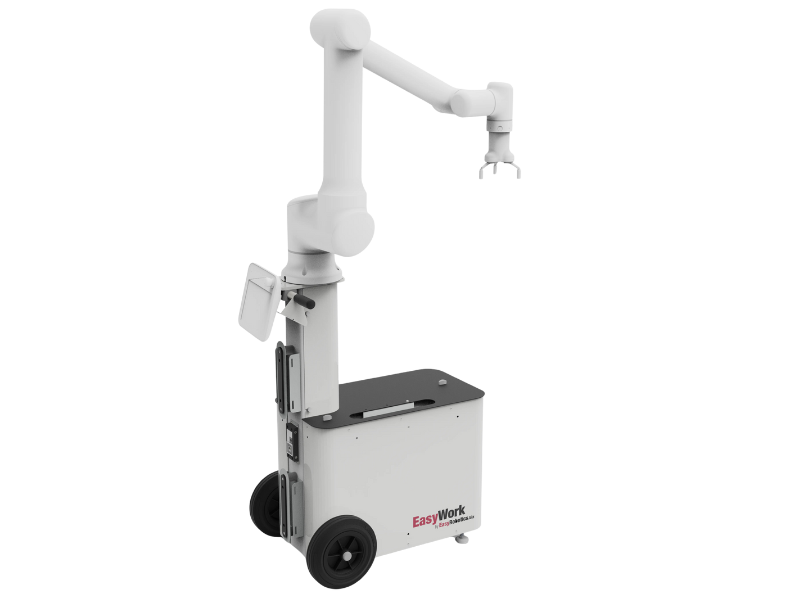
EasyWork — modular cobot workstation with configurable work surface for assembly, inspection, and handling tasks
Robotic Workstation by Application: Which Platform Fits Which Process?
The clearest way to select the right robotic workstation is to map the application requirements directly to the platform capabilities. Here is how the most common manufacturing cobot applications align to the EasyRobotics workstation range.
• CNC Machine Tending
CNC tending demands a workstation that can store enough raw blanks to run through an extended unattended window — ideally a full shift or overnight — while maintaining precise, consistent part presentation for every robot pick. The workstation must also be height-adjustable to match the CNC machine's spindle and chuck position, and mobile enough to be repositioned to a different machine when the job changes. The ProFeeder Tray and ProFeeder S are purpose-built for this application, with multi-tray feeder systems capable of holding 150 kg of raw blanks per tray. For applications requiring the highest tray capacity, the ProFeeder X and ProFeeder X-XL extend the range further.
• Assembly and Inspection
Assembly applications typically need a clean, organised work surface with defined zones for incoming components, robot work area, and outgoing finished parts. Inspection cells add lighting requirements and often a defined reference fixture. The EasyWork and EasyDesk platforms serve these applications well — their modular surface systems can be configured with dividers, bins, and fixtures to create a structured layout that keeps the robot's pick points consistent and reduces cycle time from variation in part presentation.
• Collaborative Welding
Welding with a cobot introduces specific workstation requirements beyond the standard platform criteria: the work surface must accommodate welding fixtures and the workpiece geometry, weld spatter and fume must be managed, and the robot cables must be protected from the welding environment. For applications where the robot and operator share the workspace using a rotary table, the EasyTurnTable provides a two-station layout that keeps the robot welding on one fixture while the operator loads the other. The EasyWeld Station provides a complete enclosed welding cell for higher-volume batch production. Both are built around the Siegmund welding table system for precision fixture holding.
• Dispensing and Adhesive Application
Dispensing applications — adhesive application, sealant, conformal coating, or lubricant dispensing — require a workstation with a stable, vibration-free base (path accuracy matters significantly in dispensing), defined part fixturing, and clean cable routing that does not interfere with dispensing head positioning. The EasyDesk and EasyWork platforms with appropriate work surface configurations are the most commonly deployed EasyRobotics solutions for dispensing applications.
• End-of-Line Palletizing
Palletizing workstations have specific geometry requirements: the robot must reach from the pick point (conveyor or staging position) to the farthest corner of the pallet at the maximum stack height, without exceeding its payload rating at full reach. The workstation base must position the robot at the correct lateral offset and height to make this geometry work. The EasyRobotics EasyPalletizer family — Basic, standard, Pro, and Flex — are each engineered as complete palletizing workstations with pallet positioning, multi-height operation, and cobot mounting geometry already resolved.
🔧 Quick Application-to-Platform Reference
• CNC Machine Tending: ProFeeder S, ProFeeder Tray, ProFeeder X / X-XL, ProFeeder Compact
• Assembly / Inspection / Handling: EasyWork, EasyDesk Tray, EasyDesk Alu
• Fixed-Position Cobot Deployment: EasyPedestal, EasyWork
• Collaborative Welding: EasyWeld Station, EasyTurnTable, EasyDesk Welding
• End-of-Line Palletizing: EasyPalletizer Basic / Standard / Pro / Flex
• High-Risk Process / Enclosed Cell: FlexiGuard Tending Station, Easy Enclosure
The EasyRobotics Modular Platform: Why a Common Design Language Matters
One of the most significant long-term advantages of the EasyRobotics workstation range is that every product in the portfolio is designed around a common modular architecture. This is not a cosmetic marketing point — it has direct practical consequences for manufacturers who deploy automation at scale or plan to expand their cobot installations over time.
When every workstation in your facility shares the same mounting interface, cable routing convention, and cobot compatibility protocol, adding a new cell does not require a bespoke engineering exercise. An operator trained on the EasyWork can be productive on the ProFeeder S on their first day. A controller configured for one cell can be adapted to another without starting from scratch. And if your production mix shifts — as it always does — a workstation purchased for CNC tending can be repurposed for a welding application with modular reconfiguration rather than capital replacement.
This modular philosophy also extends to the cobot integration layer. Because EasyRobotics workstations are engineered to accept 99% of cobot brands without modification, you are not committed to a single robot manufacturer's ecosystem. If Universal Robots is your current standard but Doosan becomes preferred for a specific payload requirement, the workstation continues to serve — only the robot arm changes.
"We started with one EasyWork for our assembly cell. Six months later we added a ProFeeder for CNC tending. The same operator runs both — and the same cobot could theoretically do either task. That flexibility is exactly what we needed as a job shop." — Henrik S., Operations Manager, EasyRobotics Customer
What Does a Robotic Workstation Actually Cost — and What Is the ROI?
The question of cost for a robotic workstation is inseparable from the question of what the workstation is doing. A robot pedestal in isolation is a relatively modest investment — the major cost in any cobot deployment is the robot arm itself, which ranges from €25,000 to €80,000+ depending on payload and reach. The workstation typically represents 15–35% of the total cell cost, depending on its integration level.
The more useful financial lens is the total system ROI — the combined return on the robot arm, workstation, and any peripheral equipment, measured against the labour, quality, and throughput benefits the cell delivers. EasyRobotics customers across all workstation tiers consistently report full system ROI within 6–8 months for CNC tending and assembly applications, and 8–10 months for palletizing and welding applications where the cell cost is higher.
Three factors drive this rapid payback: direct labour cost reduction (typically one to two operators per cell replaced or redeployed), throughput improvement from consistent cycle times unaffected by breaks, shift changes, or fatigue, and quality improvement from repeatable robot positioning versus human variability. Use the EasyRobotics ROI Calculator to model these against your specific shift structure, labour costs, and current throughput.
📊 Illustrative System Cost and ROI — Modular Tending Cell
Application: CNC lathe tending, two shifts, one dedicated operator
System cost (cobot + ProFeeder + tooling): €45,000–€65,000
Annual operator cost saved (2 shifts): €80,000–€95,000
Throughput uplift (54% → 89% utilisation): additional €20,000–€35,000 output value per year
Payback period: 6–8 months. Year 2+ is pure compounding return.
Common Mistakes When Choosing a Robotic Workstation
After supporting hundreds of cobot deployments across Europe and North America, EasyRobotics engineers have observed the same specification mistakes appearing repeatedly. Awareness of these upfront prevents expensive post-installation corrections.
• Specifying by price rather than application fit
The cheapest workstation that physically holds the robot up is rarely the right choice. A generic steel pedestal that vibrates under dynamic loads, has no cable management, and cannot be adjusted to match the machine height will cost far more in rework and lost production than the price difference between it and a purpose-engineered solution.
• Ignoring height adjustment requirements
CNC machines, conveyor heights, and assembly bench heights vary considerably between installations. A workstation purchased at a fixed height for one machine may be unusable on the next. Unless the specific working height has been confirmed against the machine geometry, specify a platform with height adjustment capability.
• Underestimating the impact of mobility
Operations managers frequently underestimate how often the production floor layout changes. A workstation without castor-mounted mobility becomes a permanent fixture the moment it is installed. In a job shop or contract manufacturing environment, this permanence is a significant hidden cost.
• Over-specifying for a first deployment
Not every application needs an enclosed cell with integrated safety systems and a multi-tray feeder. A well-chosen modular workstation at the right integration level — not the maximum integration level available — delivers faster payback and leaves budget for the next cell. EasyRobotics application engineers are available at no charge to advise on the correct specification for your specific application.
Frequently Asked Questions
🔗 Explore the EasyRobotics Workstation Range
• EasyPedestal — stable robot pedestal for fixed-position cobot deployments
• EasyWork — modular cobot workstation for assembly, inspection, and handling
• EasyDesk — configurable work surface workstation for bench-level applications
• ProFeeder Tray — integrated CNC tending cell with multi-tray feeder
• ProFeeder S — compact high-capacity tending cell, 150 kg per tray
• EasyWeld Station — complete enclosed robotic welding workstation
• CNC Machine Tending Solutions — full application guide for automated CNC loading
Conclusion
The robotic workstation is not an afterthought to the cobot purchase — it is the structure that determines whether the automation delivers on its potential or creates the kind of persistent, hard-to-diagnose problems that erode confidence in the entire project. Getting the platform specification right means matching integration level to application requirements, prioritising mobility for flexible manufacturing environments, and choosing a system with universal cobot compatibility that protects the investment over a multi-year horizon.
The EasyRobotics modular platform covers the full spectrum of robotic workstation requirements — from the EasyPedestal for simple fixed-position deployments to fully integrated machine tending cells and enclosed welding stations for complex applications. Every product in the range shares a common design language, universal cobot compatibility, and the same commitment to same-day deployment without specialist integration teams. If you are ready to specify the right workstation for your application, the EasyRobotics team is available to assess your requirements and recommend the correct platform — at no charge.
Ready to Specify Your Robotic Workstation?
Talk to an EasyRobotics application engineer. Get a platform recommendation,
a deployment plan, and a detailed ROI calculation — at no charge.