
EasyDesk – Modular Robot Workstation for Cobot Automation
EasyDesk is a modular robot workstation for CNC machine tending, assembly and repetitive handling. The EasyDesk Tray version provides a 1190 × 790 mm stainless-steel work area to organise parts for the robot, with a mounting console that can be repositioned along three sides.
Choose Tray for organised part presentation, ALU for fixtures and tooling, or Welding for a welding setup. Share your robot model, part dimensions and production task to request a suitable configuration and quote.
Easydesk Tray
3D View
Flexible Cobot Workstation for CNC Machine Tending and Production
EasyDesk combines a steel robot base, controller storage and a work surface selected for the application. Use the Tray version to present components for CNC machine tending, assembly, inspection and repetitive handling.
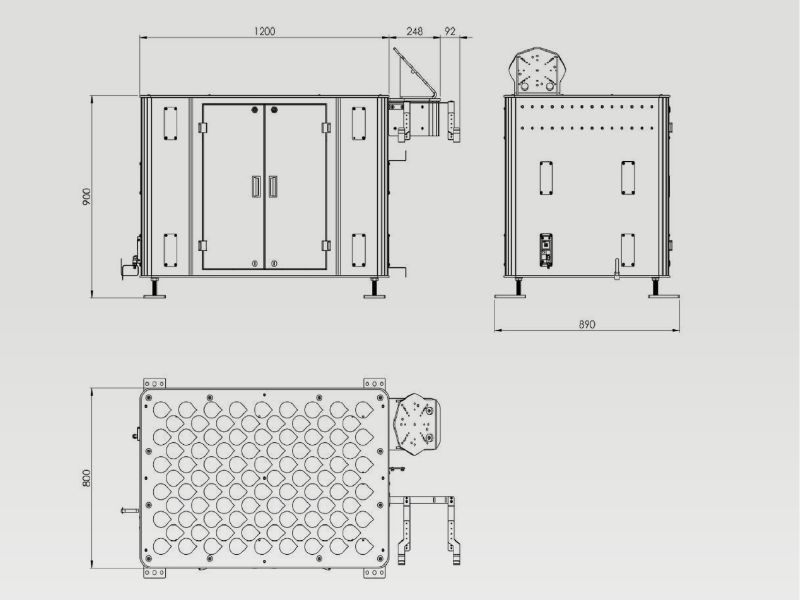
EasyDesk Tray ED-1000-T measures 1550 × 890 × 902 mm and weighs 330 kg. It includes a teach-pendant bracket, a 700 × 500 × 650 mm controller compartment and the DT-1000-04 tray insert. Installation also requires the robot-specific adapter, tooling, controls, programming and floor anchoring.
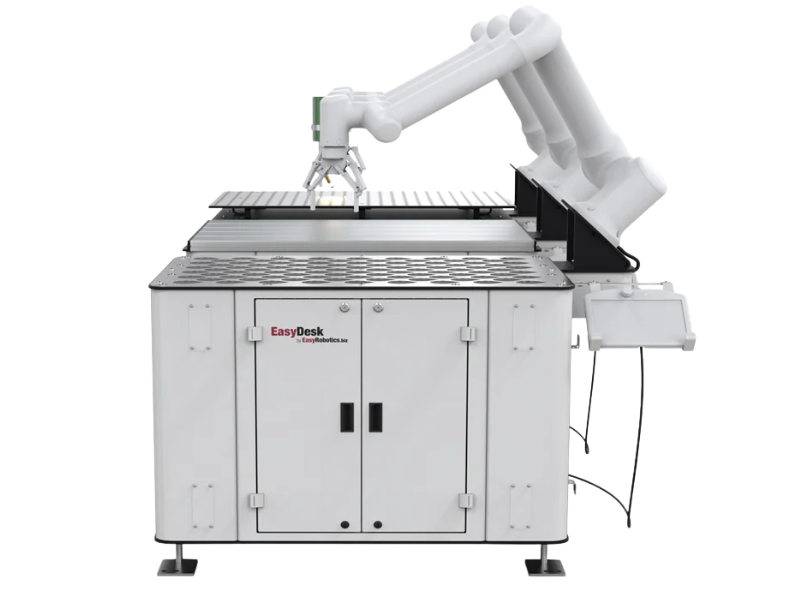
EASYDESK TRAY
A 2 mm stainless-steel parts tray with a 1190 × 790 mm work area. Choose a tray pattern and spacing suited to the components and robot handling task.
EASYDESK ALU
An aluminium-profile work surface for clamps, fixtures and process tooling. Compare EasyDesk ALU when your application needs a configurable fixture layout.
EASYDESK WELDING
A dedicated worktable for welding fixtures and clamping. See EasyDesk Welding to assess the tabletop, tooling and integration options for your welding process.
EasyDesk Tray – Parts Presentation for Machine Tending
- Organised work area: The 1190 × 790 mm stainless-steel tray presents parts in defined positions for machine loading, assembly and inspection.
- Tray configuration: Select the tray pattern around the part geometry, required capacity and robot access. Confirm the position count and spacing in the project quotation.
- Project cost and payback: Request a quote for the workstation, robot adapter and integration scope. Evaluate payback against your cycle time, labour requirements, production volume and installed cost.
- Part buffer: A configured tray lets the robot handle a batch between operator refills. Unattended running time depends on the number of usable positions, machine cycle and process reliability.
- Flexible robot position: Reposition the mounting console along three working sides and select 0° or 45° mounting. Verify reach and access for the chosen robot and part layout.
Applications:
- Polishing
- Welding
- Bin Picking
- Assembly
- Measurement
Match the robot, gripper or process tool and tray layout to the task. For welding fixtures, review the dedicated EasyDesk Welding version before selecting a tabletop.

Configure EasyDesk Tray Around Your Parts
Select a teardrop, square or custom tray pattern to present your components consistently. Part dimensions, gripper access and spacing determine the usable capacity; confirm the final layout with the project quotation.
The 330 kg workstation combines a steel base with a stainless-steel parts tray. Level and anchor the workstation before robot operation.
The controller compartment, teach-pendant bracket and cable routing help organise installation. Robot mounting, machine communication, tooling and the application program must be completed for the process.
Use your machine cycle time and tray capacity to estimate the interval between operator refills. Include loading, unloading and changeovers when assessing the production benefit.
Share a part drawing or dimensions, the robot model and the production task so the tray and mounting arrangement can be specified for your application.
EasyDesk Enclosure and Guarding Options
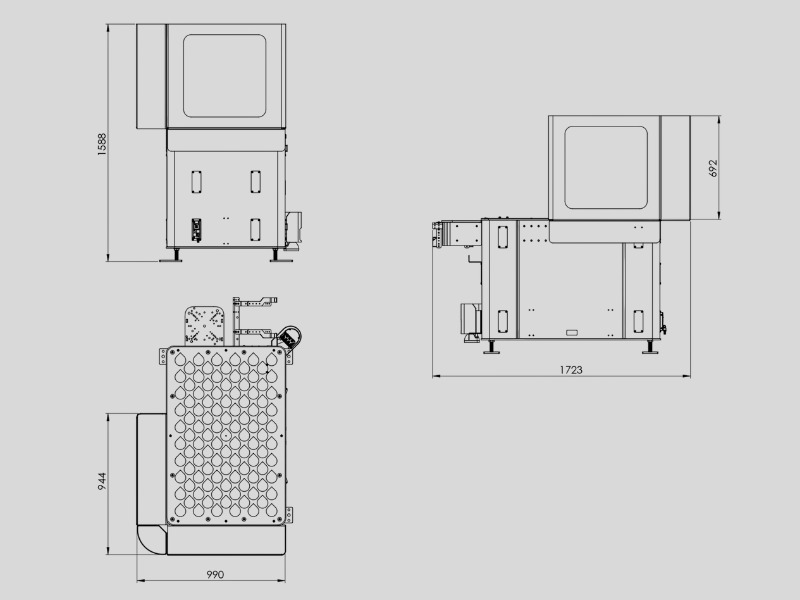
Enclosure options help define the robot working area while maintaining visibility of the process. Choose the enclosure configuration around the workstation, robot movement, operator access and application.
The options include two-wall guarding, an extension version and an enclosed robot cell. Confirm the required access doors, interlocks and other protective measures for the complete installation; adding an enclosure alone does not establish cell safety compliance.
Compare the EasyDesk Enclosure and discuss the process with EasyRobotics. Welding, polishing, machine tending and other tasks have different guarding and access requirements.

EasyDesk Tray video
Drawing
EasyDesk Tray
EasyDesk With Enclosure
Product Order Overview
| ED-1000-T | EasyDesk Tray | H: 902 mm, W: 1550mm, L: 890mm, Wt: 330 kg, T-Pad bracket, Compartment for controller, DT-1000-04 included |
| ED-1002-SE | EasyDesk Safety Enclosure 2-walls, Fits all the EasyDesk versions | Fits all the EasyDesk versions |
| ED-1003-SE | EasyDesk Safety Enclosure 2 walls with extension | Fits all the EasyDesk Tray and Alu |
| ED-1001-EC | EasyDesk Enclosure - Compact Enclosed Robot Cell | Fits all the EasyDesk versions |
| LWS-1001 | Replacement laser welding safety window Uwex | EN 207 full protection; EN 60825 6 ±0,3 for CO2 W x H: 297 x 210 |
| GD-Wheels | Wheels for EasyDesk | Caster wheel with foot locker |
| PFF-1002-05 | Extra Front/Rear dock for larger robots | Extra Front/Rear dock when mounting larger robots |
| ER-Angle-30 | Angle for EasyDesk 30 degrees | 30 degrees angle |
| ER-Angle-45 | Angle for EasyDesk 45 degrees | 45 degrees angle |
| ER-Handle | Handle for EasyDesk series | Handle to push/pull the EasyDesk |
| SC-1000 | Yellow Scanner cover | Cover for laser scanner |
| RAL-XXXX | Custom RAL code | RAL Code XXXXX |
FREQUENTLY ASKED QUESTIONS (FAQ’s)
Review workstation selection, robot mounting, installation and configuration before requesting your EasyDesk quote.
Get Expert Help for Your Automation Project
Tell us your requirement and our automation specialists will get back to you within 24 hours.