Cobot Welding Tables for Tower Legs
& Heavy Structural Fabrication
A buyer's guide for fabricators moving repetitive structural welds — tower legs, lattice
frames, and gusseted steel — onto a robotic welding workstation.
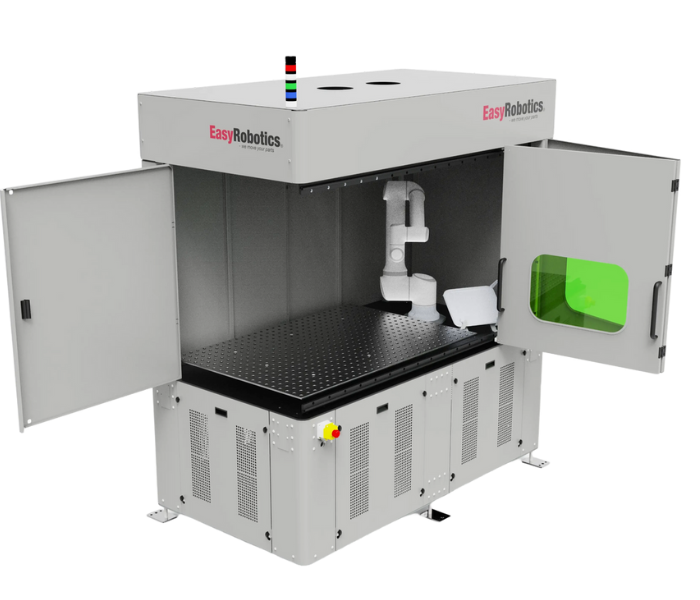
Most robotic welding content online is written for sheet metal brackets and small assemblies. If your shop is welding tower legs, lattice frames, or gusseted structural steel, that content mostly does not apply — the parts are longer, heavier, and the joints are load-bearing, not cosmetic. The fixturing, the table, and the way the robot reaches the part all change once you are working at structural scale.
That gap is exactly where a lot of fabricators searching for a robotic welding workstation for tower legs or a cobot welding table end up stuck: plenty of generic automation marketing, very little that speaks to angle iron, channel sections, and gusset plates at real structural weight.
This guide covers what actually matters when you are moving repetitive structural welds — tower leg sections, lattice frames, telecom and utility structures — onto a cobot-based welding cell, and where a single-station table stops being enough.
"Our welds on the leg sections used to depend on which fabricator was on shift. Now every gusset joint comes out the same, first pass, every time." — Erik, EasyRobotics Customer
Why Structural Fabrication Needs a Different Kind of Welding Table
Tower legs and lattice structures are built from repeating elements: angle iron or channel sections joined at gusset plates, in patterns that repeat dozens or hundreds of times across a single structure. That repetition is exactly what makes the work a strong fit for robotic welding — but only if the table underneath the robot can actually hold the part still.
A lightweight fabrication table built for brackets and small frames will flex or walk under the clamping force and heat load of structural steel. A welding table built for this class of work needs a heavier base, a proper grid or slotted surface rated for the fixture loads involved, and clamping hardware sized for the section thickness you are actually running — not the thinnest material the table was designed around.
The robot side matters just as much. A cobot welding a tower leg section needs enough reach to cover a long joint without repositioning mid-weld, and enough payload margin on the torch and wire feed setup to sustain a full duty cycle without overheating.
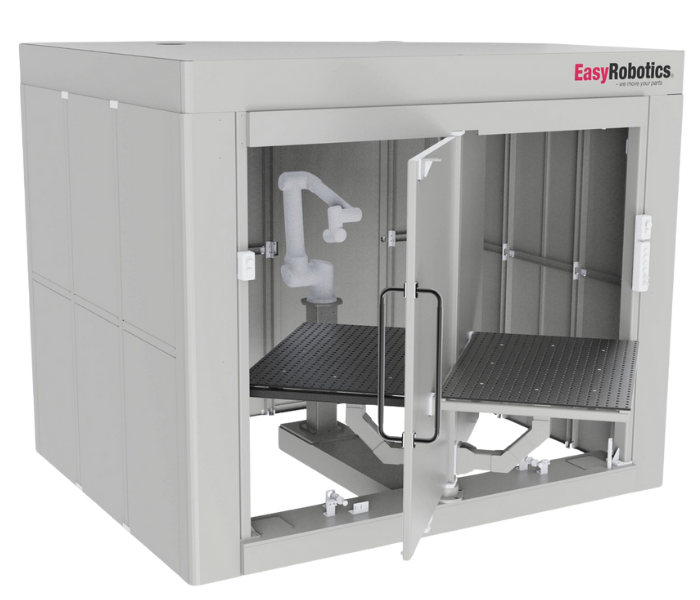
EasyWelding Turn Table — rotates long structural sections so the cobot reaches every joint face without re-clamping
Quick-Change Tabletops: Built for Mixed Structural Work
Very few fabrication shops run one part forever. A shop welding tower legs one week and a different lattice frame or bracket assembly the next needs a table that can be reconfigured without a half-day of fixture rebuilding.
A cobot quick-change welding table uses a modular grid tabletop — commonly seen in sizes like 36x36 and 72x36 in fabricator searches — so fixtures, stops, and clamps can be repositioned or swapped between jobs in minutes rather than hours. For shops that quote structural work job by job rather than running one product continuously, this single feature often has more impact on daily throughput than the robot itself.
When comparing tables, ask specifically about grid hole spacing, tabletop load rating, and how fixtures are indexed and located — repeatable location is what lets the robot's weld program stay valid from one job to the next, instead of needing to be re-taught every changeover.
🔧 What to Check on Any Structural Welding Table
• Load rating of the tabletop and base, not just the robot's payload
• Grid hole spacing and fixture repeatability between changeovers
• Whether a turn table is available for multi-face joints on long parts
• Single-station vs dual-station layout, based on your batch sizes
• Enclosure or fume extraction compatibility for structural steel welding
Single-Station vs Dual-Station Welding Cells
In a single-station welding cell, the operator loads a part, steps back, and waits for the robot to finish before unloading and loading the next one. It is a straightforward setup and the right choice for lower-volume or very large parts that need the full table.
A dual-station welding cell splits the table in two. While the robot welds one side, the operator loads or unloads the other — so the robot rarely sits idle waiting on the human, and the human rarely stands idle waiting on the robot. For shops running enough volume to justify it, this layout is usually the single biggest lever on parts-per-shift without adding a second robot.
The trade-off is footprint and part size. Dual-station cells need more floor space and generally suit small to mid-sized structural components better than full tower leg sections, which often make more sense on a single-station table paired with a turn table.
"Switching to the dual-station layout was the change that actually moved our output numbers. The robot almost never stops now." — Priya, EasyRobotics Customer
How EasyRobotics Approaches Heavy Fabrication Welding
The EasyWeld Station pairs a collaborative robot with a precision Siegmund welding table, built to hold structural fixturing rather than only light sheet metal jigs. It is designed to bring consistent, repeatable welds to fabrication shops that have historically relied entirely on manual welders for load-bearing joints.
For long parts like tower leg sections, the EasyWelding Turn Table rotates the workpiece into position so the cobot can reach multiple faces of a joint without the part being unclamped and repositioned manually between passes — the step that usually introduces the most variation in manual structural welding.
Fabricators running mixed structural work can also configure the cell around EasyDesk Welding tabletops or a single-column welding table, depending on part size and how often fixtures need to change between jobs. If your parts require a full enclosure for fume extraction or operator separation during continuous structural welding, EasyRobotics can also configure the cell with a dedicated robotic welding enclosure.
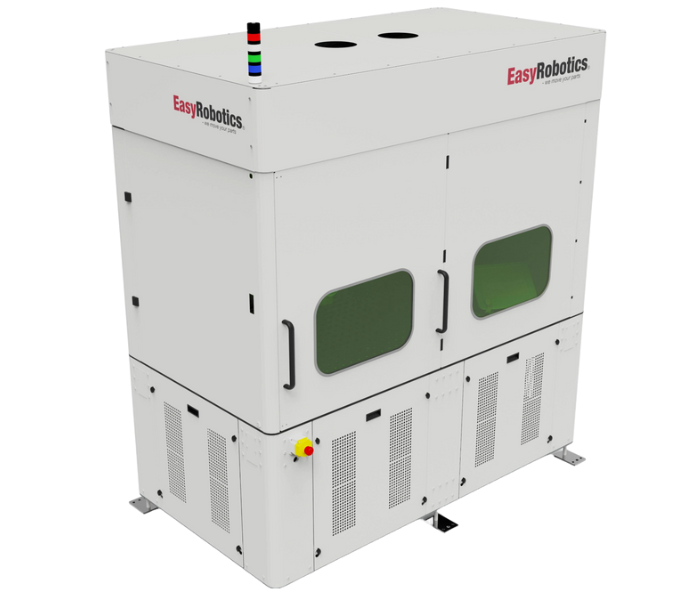
EasyWeld Station configured as a dual-station cell for higher-volume structural welding
Is Robotic Welding the Right Call for Your Structural Work?
Cobot welding tables deliver the strongest results on structural work with a specific profile. Use this checklist to gauge fit before you start comparing quotes.
✅ Good Fit for Robotic Welding If You Have…
• Repeating joint geometry, like tower leg gusset connections or lattice frame joints
• Weld quality that currently varies depending on which fabricator is on shift
• Enough batch volume to justify fixture time, even with quick-change tooling
• Long or multi-face parts that would benefit from a turn table over manual repositioning
• Difficulty hiring or retaining certified structural welders
If your work is genuinely one-off fabrication with no repeating joints, or requires a certified welder's real-time judgement on every pass, manual welding may still be the right call for that specific job — a customised automation assessment from EasyRobotics can help separate which parts of your work are automation candidates and which are not.
Frequently Asked Questions
Conclusion
Structural fabrication — tower legs, lattice frames, gusseted steel — has different requirements than the sheet-metal welding most automation content is written for. The right cobot welding table for this work is heavier, the fixturing is designed for load-bearing joints, and a turn table often matters more than raw robot speed.
Get those fundamentals right and the payoff is straightforward: welds that no longer depend on which fabricator is on shift, and a floor that can take on more structural volume without adding headcount one welder at a time.
Ready to Automate Your Structural Welds?
Talk to an EasyRobotics automation specialist about table sizing, fixturing, and
turn table configuration for your specific parts — at no charge.