Robotic Welding Table Guide: How to Choose
the Right Cobot Welding Workstation
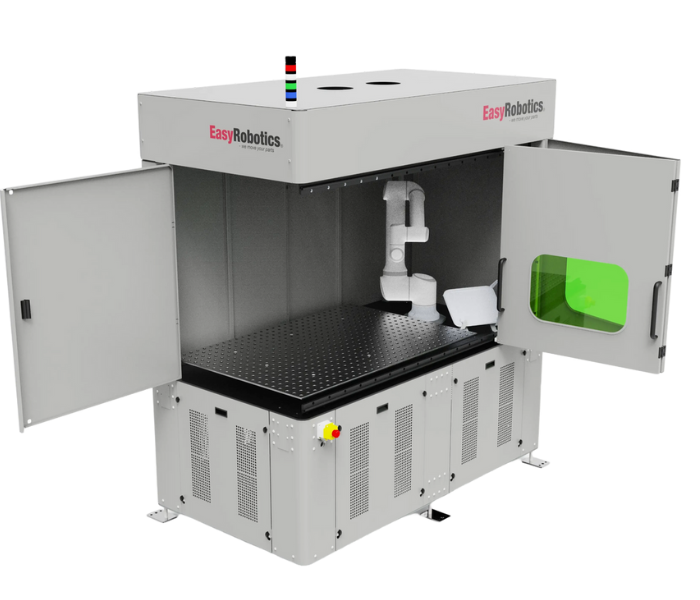
Ask ten fabrication shops what makes a robotic welding deployment succeed or fail, and most will talk about the robot — the brand, the payload, the reach. Almost none will mention the table. Yet the table is where weld quality is actually decided. It holds the part in exactly the position the robot programme expects. It absorbs heat without warping. It contains spatter and fume. And it determines whether changing from one job to the next takes five minutes or fifty.
A robotic welding table is not a generic workbench with a robot bolted nearby. It is a specified piece of process equipment — flatness tolerance, hole pattern, material hardness, and load capacity all matter, because any deviation shows up directly in weld consistency. Get the table wrong, and even the best robot programme will produce variable results. Get it right, and the table becomes the quiet, reliable foundation that makes every other part of the automation project work.
This guide covers what a robotic welding table actually needs to do, how a complete welding workstation differs from a bare table, when an enclosed cell is necessary, when a turntable configuration earns its cost, and how the EasyRobotics welding range maps to each of these requirements.
"We replaced a homemade welding jig setup with the EasyWeld Station and the difference in weld consistency was immediate. The table just doesn't move, doesn't warp, and the fixturing options meant we didn't need a new jig for every part." — Søren H., Fabrication Shop Owner, EasyRobotics Customer
What a Robotic Welding Table Actually Needs to Do
A robotic welding table performs four distinct jobs simultaneously, and a table that does only one or two of them well will eventually become the limiting factor in your weld quality or production throughput.
First, it provides a flat, dimensionally stable reference surface. The robot's weld programme is taught relative to a fixed coordinate system — if the table flexes, warps from repeated heat cycling, or was never flat to begin with, the part position drifts relative to the programmed path, and weld quality degrades in ways that are maddening to diagnose because nothing on the robot itself has changed.
Second, it provides fixturing flexibility. Production welding rarely involves a single part geometry forever. A table with a standardised perforated hole pattern — typically 16 mm holes on a regular grid — allows clamps, stops, and custom fixtures to be repositioned and reconfigured for different parts without fabricating a brand new jig for every job. This is the difference between a table that serves one product family and a table that serves your entire job book.
Third, it manages heat and material durability. Robotic welding applies repeated, concentrated thermal cycling to the same general table area, cycle after cycle, year after year. A mild steel table surface will eventually distort. A through-hardened, plasma-nitrided steel surface — the same approach used on the EasyRobotics EasyWeld Station table — resists this distortion over a much longer service life, protecting the dimensional accuracy that the whole cell depends on.
Fourth, in any production environment, the table is the anchor point for everything that keeps the process safe and clean: fume extraction ducting, spatter screening, robot mounting brackets, and safety interlocks all reference back to the table structure. A table specified in isolation from these requirements creates integration problems later that are expensive to retrofit.
EasyWeld Station welding table — perforated 16 mm hole pattern for flexible clamping and fixture repositioning across part families
Robotic Welding Table vs Workstation vs Enclosed Cell — What's the Difference?
These three terms get used interchangeably in casual conversation, but they describe meaningfully different levels of integration — and confusing them when specifying equipment leads to either over-spending or under-specifying.
The Robotic Welding Table
This is the work surface alone: the perforated steel plate, its frame, and its mounting structure. It has no enclosure, no fume extraction, and no integrated robot mount. It is the foundation, not the complete system. A standalone table is appropriate only when it will be installed inside an existing welding bay that already has the ventilation, screening, and safety infrastructure in place.
The Robotic Welding Workstation
A workstation builds on the table with an integrated robot mounting structure — typically an angled bracket positioned to maximise the robot's reach over the work area — plus defined operator access points and often a basic level of guarding. This is the right specification for shops that have general workshop ventilation and screening already, but need the table and robot positioning resolved as a single, pre-engineered unit rather than a custom fabrication project.
The Enclosed Welding Cell
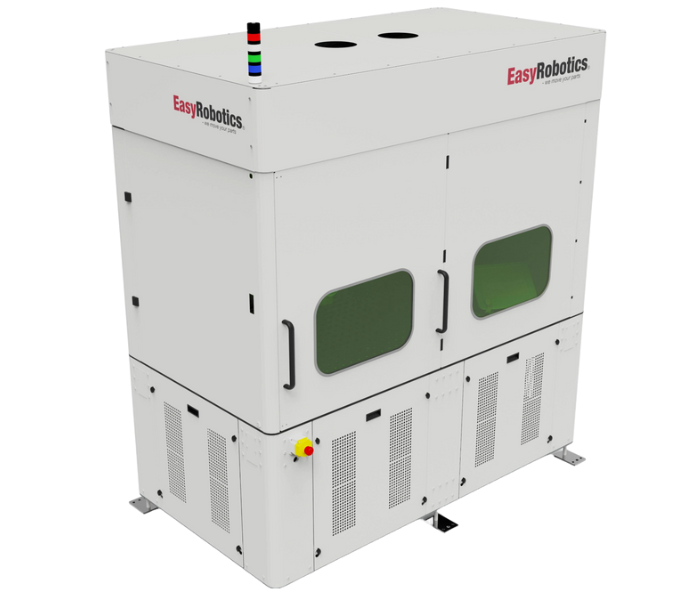
A fully enclosed cell wraps the table and robot in a complete structure with solid or mesh panel walls, a access door with interlock, viewing windows for process monitoring, and integrated fume extraction. This is the specification required wherever continuous production welding takes place near other operators, or where local regulations require containment of arc flash, spatter, and fume. The EasyRobotics EasyWeld Station is built at this level — a fully enclosed cell around the welding table, with strategic viewing windows and a close-and-start door mechanism for safe, fast part loading.
⚖️ Quick Reference — Table vs Workstation vs Enclosed Cell
Robotic Welding Table: Work surface and fixturing only. Needs existing bay infrastructure (ventilation, screening). Lowest cost, lowest integration.
Robotic Welding Workstation: Table + integrated robot mounting + operator access. Good fit where general ventilation already exists. → EasyDesk Welding
Enclosed Welding Cell: Table + robot mount + full enclosure + fume extraction + safety interlocks. Required for continuous production near other operators. → EasyWeld Station
Fixed Table vs Turntable: Which Configuration Fits Your Production Volume?
Beyond the enclosure decision, the second major specification choice is whether to use a single fixed table or a rotating turntable configuration. This decision is driven almost entirely by production volume and the relationship between weld cycle time and part loading time.
On a single fixed table, the sequence is strictly serial: load the part, the robot welds, the robot finishes, unload the part, load the next part, repeat. Every second the operator spends loading or unloading is a second the robot sits idle. For low-volume or long-cycle-time welds where loading time is a small fraction of total cycle time, this is perfectly efficient and a single fixed table is the right, cost-effective choice.
A welding turntable changes this equation by dividing the work area into two or four separate stations on a rotating platform. While the robot welds the part on one station, the operator loads or unloads a different part on another station. When the weld cycle finishes, the table rotates and the robot immediately begins on the next pre-loaded part — with no waiting. The EasyRobotics EasyWelding Turn Table uses exactly this approach, with a 360° programmable platform and a 1000 × 1500 mm weld plate, configurable into 2 or 4 stations depending on cycle time and part size.
The decision threshold is straightforward to evaluate: if part loading time is more than roughly 15–20% of total weld cycle time, a turntable configuration will measurably increase throughput by eliminating that dead time. If loading time is a small fraction of a long weld cycle, the turntable's additional cost will not be justified by a proportionally large throughput gain, and a fixed table workstation is the more capital-efficient choice.
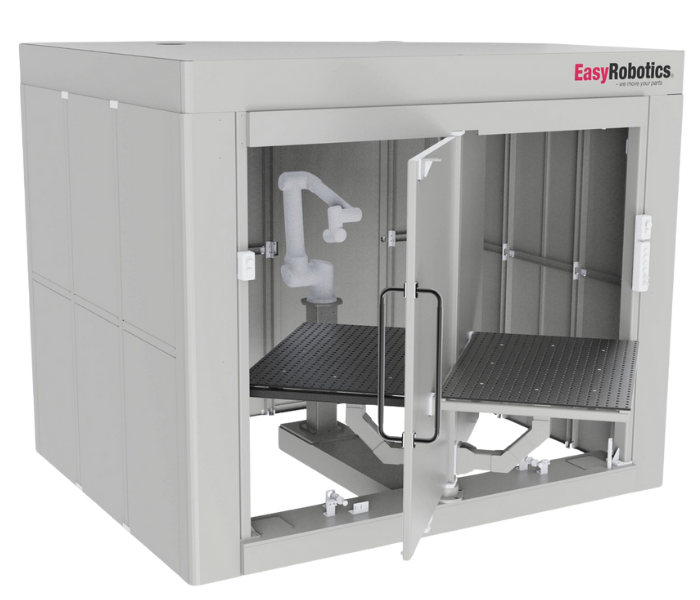
EasyWelding Turn Table — 2 or 4 station rotating platform allowing simultaneous loading and welding to eliminate cycle dead time
Specification Checklist: The Questions to Answer Before You Buy
Getting a robotic welding table specification right the first time avoids the most common and most expensive mistake in welding automation: discovering after installation that the table cannot fixture the parts you actually need to weld, or that the enclosure does not fit the floor space available.
• What is the largest and heaviest part you need to fixture?
This determines both the table footprint and the load capacity requirement. The EasyWeld Station's 1500 mm × 1000 mm tabletop with a 300–500 kg load capacity covers the majority of fabrication shop parts, but oversized or unusually heavy components may require a custom table specification.
• What welding process and current range will you be running?
MIG, TIG, plasma, and spot welding each have different fume, spatter, and arc flash characteristics, which directly affect the enclosure and extraction specification. The EasyWelding Turn Table is rated to support MIG, TIG, plasma, and spot welding processes, but always confirm the duty cycle and amperage range against the table and enclosure rating before specifying.
• How many different part geometries will share this table?
A shop welding a single repeated part can use simpler, dedicated fixturing. A job shop welding many different geometries needs the flexible perforated hole pattern and quick-change clamping that allows fixtures to be reconfigured between jobs without a fabrication delay.
• What is your loading time relative to weld cycle time?
As covered above, this single ratio determines whether a fixed table workstation or a turntable configuration delivers better throughput per euro invested.
• What floor space and ceiling height do you have available?
The EasyWeld Station's full enclosure footprint is 2210 mm (L) × 1200 mm (W) × 2420 mm (H). The EasyWelding Turn Table's footprint, given its rotating platform, is larger at approximately 2600 mm (L) × 2700 mm (W) × 2500 mm (H). Confirm both floor space and any overhead crane or ducting clearance before finalising a specification.
📋 Pre-Purchase Specification Checklist
☐ Largest/heaviest part dimensions and weight confirmed against table capacity
☐ Welding process and amperage range matched to enclosure rating
☐ Part mix and fixturing flexibility requirement assessed
☐ Loading time vs weld cycle time ratio calculated (turntable threshold check)
☐ Floor space and ceiling/ducting clearance measured against unit footprint
☐ Robot brand and mounting bracket compatibility confirmed
Safety, Fume Extraction, and Why Enclosure Is Rarely Optional
It is tempting to specify the simplest, cheapest table configuration available and address safety and extraction separately, later, as a workshop-wide investment. In practice, this almost always costs more than specifying it correctly from the start — and creates a compliance gap in the interim that exposes the business to genuine risk.
Robotic welding produces the same fume, spatter, UV radiation, and noise as manual welding — the only thing that changes is who is standing at the torch. If anything, automated cells often run at higher duty cycles than manual welders (less downtime between welds means more continuous exposure for anyone nearby), which increases rather than decreases the importance of proper containment.
A fully enclosed cell like the EasyWeld Station addresses this directly: full encapsulation contains welding fumes and debris within the cell rather than releasing them into the general workshop atmosphere, strategic viewing windows allow process monitoring without requiring operators to be inside the enclosure during welding, and dual ceiling ventilation holes maintain safe airflow within the station during heavy-duty operation. These are not premium add-ons — they are the baseline specification for any continuous-production robotic welding deployment.
The ROI Case: Why the Table Specification Affects Your Payback Period
It is easy to think of the welding table as a fixed cost that does not affect the financial return of the automation project — but the table specification directly influences three of the variables that determine payback speed.
First, fixturing flexibility determines changeover time between jobs. A table with a generic, reconfigurable hole pattern allows a job shop to move between part families in minutes rather than the hours required to fabricate and install a dedicated jig — and changeover time is dead time that does not contribute to the ROI calculation.
Second, the choice between a fixed table and a turntable configuration directly sets your achievable throughput ceiling. Where loading time represents a meaningful share of cycle time, the turntable's additional investment pays back through the additional parts produced per shift — often within the same 6–18 month window EasyRobotics customers report across the wider product range.
Third, table durability affects the frequency and cost of unplanned downtime. A table surface that distorts under repeated thermal cycling requires resurfacing or replacement — an unplanned capital cost that a properly hardened table avoids for years longer. EasyRobotics customers across more than 1,000 installations in 30+ countries report ROI timelines of 6 to 18 months depending on production volume and table configuration.
"Moving from a single fixed table to the turntable configuration cut our dead time between welds almost completely. The robot is welding nearly continuously now instead of waiting on us to reload." — Anika F., Production Supervisor, EasyRobotics Customer
Use the EasyRobotics ROI Calculator to model the payback for your specific welding application, part volume, and current labour costs.
Which EasyRobotics Welding Platform Fits Your Application?
🔧 Quick Application-to-Platform Reference
• Bench-level cobot welding, lighter parts, general workshop ventilation already in place: EasyDesk Welding
• Continuous production, fume/spatter containment required, single-station throughput acceptable: EasyWeld Station
• High loading time relative to weld cycle, need simultaneous load/weld: EasyWelding Turn Table
• Simple fixed welding surface, existing bay infrastructure for safety/extraction: Single-Column Welding Table
• Height-adjustable surface to match different robot or part configurations: Elevation Table — Weld
Frequently Asked Questions
🔗 Explore the EasyRobotics Welding Range
• EasyWeld Station — enclosed cobot welding cell with plasma-nitrided steel table
• EasyWelding Turn Table — 2 or 4 station rotating welding platform
• EasyDesk Welding — modular bench-level cobot welding workstation
• Single-Column Welding Table — simple, dedicated welding fixture mount
• Elevation Table — Weld — height-adjustable welding work surface
• ROI Calculator — model your welding automation payback period
Conclusion
The robot arm gets the attention, but the table is what makes a robotic welding cell actually work in production. Flatness, hole pattern flexibility, thermal stability, and load capacity are not secondary specifications — they directly determine your weld quality, your changeover speed between jobs, and how safely the cell operates day after day. Choosing between a fixed table and a turntable, and between an open workstation and a fully enclosed cell, should be driven by your specific production volume, part mix, and welding process — not by whichever option happens to be cheapest on paper.
EasyRobotics offers the full spectrum of robotic welding table configurations — from the simple Single-Column Welding Table through to the fully enclosed EasyWeld Station and the high-throughput EasyWelding Turn Table — all built around durable, plasma-nitrided steel surfaces and universal cobot compatibility. If you are ready to specify the right welding table for your fabrication shop, EasyRobotics application engineers are available to review your application and recommend the correct configuration, at no charge.
Ready to Specify Your Robotic Welding Table?
Talk to an EasyRobotics welding automation specialist. Get a configuration recommendation,
a tailored quote, and a payback calculation — within 24 hours.